

Managing teams today is very different from what it used to be. With remote work, hybrid setups, and distributed teams becoming the norm, businesses need better visibility into how work is actually getting done. This is where tools like EmpMonitor come into the picture.
If you’ve been exploring options for employee monitoring, you’ve likely come across this platform. But the real question is does it actually deliver value, or is it just another tool with basic tracking features?
In this EmpMonitor review, we’ll take a closer look at what the platform offers, how it works, and whether it’s the right fit for your business. From tracking productivity to improving team accountability, tools like this promise a lot but not all of them deliver in practical, day-to-day use.
We’ll break down its features, usability, and real-world benefits so you can make an informed decision without wasting time or resources.
What Is EmpMonitor and How Does It Work?
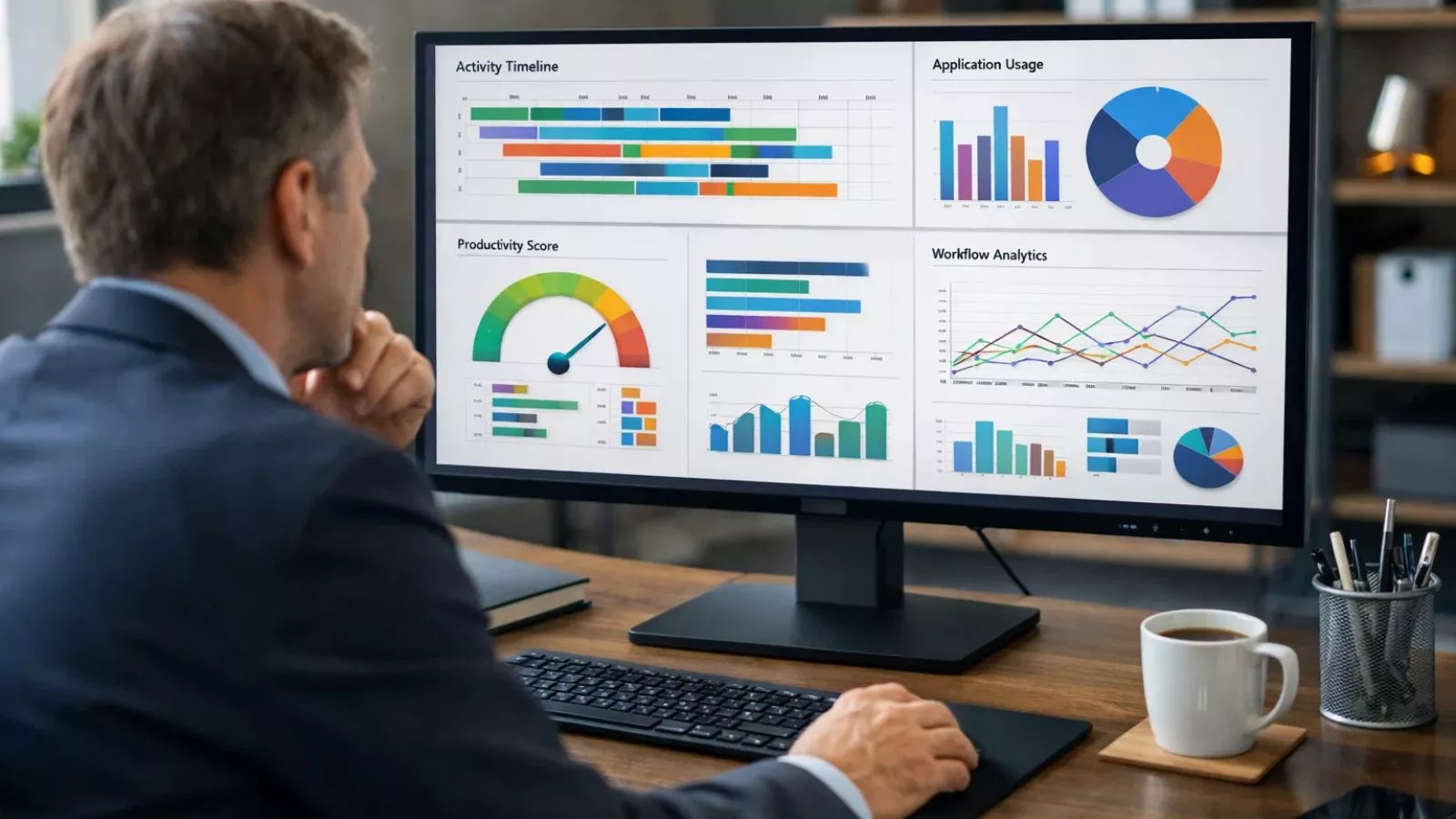
At its core, EmpMonitor is an advanced workforce management software designed to help businesses track employee activity, monitor productivity, and streamline operations. It’s built for companies that want better control over their teams without micromanaging every task.
The platform works by collecting data on employee activities during work hours. This includes app usage, website tracking, time spent on tasks, and overall productivity patterns. Managers can then access this data through a centralized dashboard, making it easier to understand how time is being spent across the organization.
Unlike a basic project management tool, EmpMonitor focuses more on behavior insights rather than just task completion. It helps answer questions like:
- Are employees spending time on productive tasks?
- Where is time being wasted?
- How can workflows be improved?
This makes it especially useful for remote teams where visibility is often limited.
Another key aspect is automation. Instead of manually tracking hours or performance, the system generates reports and insights that help managers make better decisions. Over time, this can lead to improved efficiency and more structured workflows.
Key Features of EmpMonitor
When evaluating any employee monitoring solution, features are what truly define its usefulness. The platform offers a range of tools designed to give businesses better visibility into team performance while keeping operations organized and efficient.
One of its core features is real-time activity tracking. Managers can see what employees are working on during office hours, including applications used and websites visited. This helps identify productive and non-productive patterns without needing constant check-ins.
Another important feature is automated time tracking. Instead of relying on manual timesheets, the system logs working hours automatically. This reduces errors and ensures that time data is accurate and consistent across teams.
The platform also includes productivity analysis, which categorizes activities into productive and unproductive segments. This gives a clearer picture of how time is being utilized and helps in making better decisions around workload and efficiency.
For teams handling multiple tasks, it also provides insights that go beyond a typical project management tool. Rather than just showing what needs to be done, it highlights how work is actually being carried out.
In addition, detailed reports and analytics make it easier to track attendance, monitor trends, and identify areas that need improvement.
Overall, the feature set focuses on combining visibility with actionable insights, making it a practical choice for businesses looking to improve productivity without overcomplicating processes.
Benefits and Real-World Use Cases
Understanding features is one thing, but what really matters is how a tool performs in real-world scenarios. This is where platforms like EmpMonitor show their practical value.
One of the biggest advantages is improved productivity visibility. Managers no longer have to rely on assumptions or manual updates. Instead, they get a clear picture of how work hours are being spent, which helps in identifying inefficiencies early.
For remote and hybrid teams, this becomes even more important. Without physical supervision, it’s easy for communication gaps or distractions to affect output. A reliable employee monitoring system helps bridge that gap by providing consistent insights without interrupting workflows.
Another key benefit is better time management. By tracking how long tasks actually take, teams can plan more realistically and avoid overloading employees. This leads to smoother operations and fewer missed deadlines.
Businesses also use such tools for accountability and transparency. When everyone is aware that work patterns are being tracked, it naturally encourages more focused and disciplined work habits.
In terms of use cases, the platform fits well across industries whether it’s IT companies managing developers, agencies handling multiple clients, or support teams working in shifts. It also complements any existing workforce management software by adding a layer of behavioral insights that many tools lack.
Overall, the real value lies in turning raw activity data into meaningful actions that improve both individual and team performance.
Pros And Cons of EmpMonitor
 No tool is perfect, and it’s important to look at both sides before making a decision. This EmpMonitor review wouldn’t be complete without a clear breakdown of where the platform performs well and where it may fall short.
Pros
One of the biggest strengths of EmpMonitor is its detailed activity tracking. It gives managers a clear view of how time is being spent without needing constant follow-ups. This is especially useful for remote teams where visibility is limited.
Another advantage is automation. From time tracking to report generation, most processes run in the background, saving time and reducing manual effort. This makes it easier for teams to focus on actual work rather than administrative tasks.
The platform also stands out for its productivity insights. Instead of just collecting data, it presents it in a way that helps businesses identify patterns, improve workflows, and make informed decisions.
Additionally, it integrates well into existing systems and can support businesses already using a project management tool, adding an extra layer of performance tracking.
Cons
On the downside, the level of monitoring might feel too detailed for some teams. Employees who are not used to tracking tools may take time to adjust, especially in organizations with a strong focus on autonomy.
There can also be a learning curve for new users. While the dashboard is feature-rich, it may take some time to fully understand and use all its capabilities effectively.
Lastly, for very small teams or startups, the full range of features might feel more than necessary, especially if basic tracking is all they need.
Pricing and Who Should Use EmpMonitor
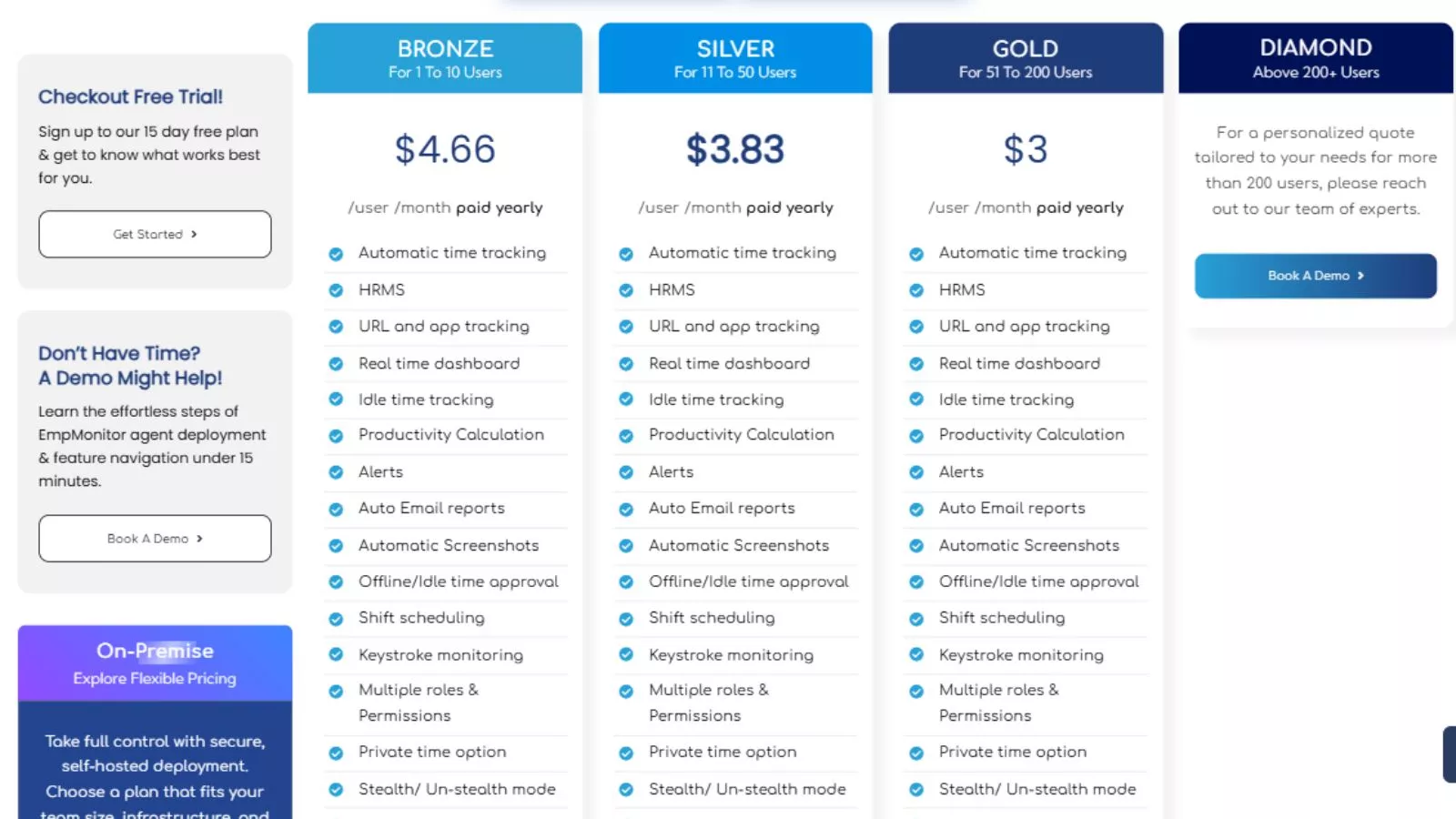
When choosing any software, pricing and fit are just as important as features. While exact plans may vary depending on business size and requirements, EmpMonitor is generally positioned as a scalable solution that can adapt to different team sizes.
For small businesses, the platform offers essential tracking and monitoring capabilities that can help establish structure and accountability early on. However, to truly get value, teams need to actively use the insights rather than just collect data.
For mid-sized companies, this is where EmpMonitor becomes more impactful. With growing teams, it becomes harder to manually track performance or identify inefficiencies. Having a centralized system that provides visibility into daily operations can significantly improve decision-making and workflow management.
Larger organizations benefit the most from its full capabilities. With multiple departments and complex operations, having access to detailed reports, productivity insights, and automated tracking can streamline management and reduce operational gaps.
In terms of suitability, this tool works best for:
- Remote and hybrid teams needing better visibility
- Agencies managing multiple clients and deadlines
- IT and development teams tracking productivity
- Businesses looking to strengthen their employee monitoring approach
At the same time, if a company is only looking for a simple time tracker, a lighter solution might be enough. But for those who want deeper insights and long-term improvements, EmpMonitor offers a more comprehensive approach.
EmpMonitor vs Other Employee Monitoring Tools
With so many tools available, it’s natural to compare options before making a decision. While many platforms offer basic tracking features, the difference usually comes down to depth, usability, and insights.
Compared to standard employee monitoring tools, EmpMonitor focuses more on detailed activity analysis rather than just screenshots or time logs. Many tools stop at showing what employees are doing, but this platform goes a step further by helping you understand patterns and productivity trends over time.
When placed alongside a typical project management tool, the difference becomes even clearer. Project management platforms are designed to organize tasks, assign responsibilities, and track deadlines. However, they don’t always show how efficiently those tasks are being completed. This is where EmpMonitor complements such systems by adding behavioral insights.
Another area where it stands out is automation. While some tools require manual setup and frequent adjustments, this platform simplifies reporting and tracking with minimal intervention. This can save time for managers who don’t want to spend hours analyzing raw data.
That said, some competing tools may offer simpler interfaces or lighter tracking, which can be more suitable for smaller teams. The right choice ultimately depends on how much visibility and control your business actually needs.
In short, if your priority is basic tracking, many tools can do the job. But if you’re looking for deeper insights and long-term productivity improvements, EmpMonitor positions itself as a more complete solution.
Best Practices for Using EmpMonitor Effectively
Implementing a monitoring tool is not just about installing software—it’s about how you use it within your team. To get the most value out of EmpMonitor, businesses need to focus on the right approach rather than just the data.
First, be transparent with your team. Let employees know what is being tracked and why. When people understand that the goal is productivity improvement—not micromanagement—they are more likely to accept and adapt to the system.
Second, focus on insights, not surveillance. It’s easy to get caught up in checking activity logs constantly, but that can create unnecessary pressure. Instead, use the data to identify patterns, improve workflows, and support employees where needed.
Another important practice is to set clear productivity benchmarks. Without defined expectations, data has little meaning. Establish realistic goals so that tracking becomes a tool for improvement rather than confusion.
You should also review reports regularly but not obsessively. Weekly or bi-weekly analysis is often enough to spot trends and make adjustments without overwhelming managers or teams.
Finally, combine the tool with existing systems. Whether you’re already using a project management tool or other workforce management software, integrating insights from different platforms can give you a more complete picture of performance.
When used correctly, EmpMonitor becomes more than just a tracking tool it becomes a system that supports better decision-making, improved accountability, and healthier work habits.
Is EmpMonitor Worth It?
After looking at its features, benefits, and real-world applications, it’s clear that EmpMonitor is more than just a basic tracking tool. It’s designed for businesses that want deeper insights into how work gets done, not just surface-level data.
If your team struggles with visibility, productivity gaps, or managing remote employees, this platform can make a noticeable difference. It helps shift the focus from guesswork to data-driven decisions, which is essential in today’s work environment.
That said, it’s not for everyone. Teams that prefer complete autonomy or only need simple time tracking might find it more advanced than necessary. But for businesses serious about improving efficiency and accountability, it offers real value.
Why Businesses Are Choosing EmpMonitor
One of the biggest reasons companies are adopting EmpMonitor is its ability to combine monitoring with actionable insights. Instead of just showing activity, it helps managers understand trends, optimize workflows, and make smarter decisions.
It also fits well into modern work setups. Whether you’re managing a remote team, running an agency, or scaling operations, having a system that provides clarity without constant supervision is a major advantage.
Another factor is ease of use. Despite offering advanced features, the platform is designed to be practical for everyday use. Once set up, it runs in the background and continuously provides useful data without interrupting workflows.
When compared to other tools, this balance between depth and usability is what makes EmpMonitor stand out. It’s not just about tracking it’s about improving how teams work over time.
Frequently Asked Questions (FAQs)
- What is EmpMonitor used for?
It is used to track employee activity, monitor productivity, and improve overall team performance through data-driven insights. - Is EmpMonitor suitable for remote teams?
Yes, it works especially well for remote and hybrid teams by providing visibility into daily work without constant supervision. - Does EmpMonitor replace a project management tool?
No, it complements a project management tool by adding insights into how tasks are being executed rather than just tracking completion. - Is employee monitoring safe and ethical?
It can be, as long as businesses are transparent and use it to support productivity rather than micromanage employees.