
Managing modern networks isn’t just about keeping devices online anymore. IT teams and MSPs today deal with distributed environments, remote sites, constant configuration changes, and users who expect zero downtime. That’s the context in which Auvik positions itself, not as an overly complex enterprise platform, but as a network management software that focuses on visibility, automation, and speed.
In this Auvik review, we take a grounded, experience‑driven look at how the platform actually performs in real environments. Instead of repeating feature lists, we focus on how Auvik feels to use day‑to‑day, where it saves time, and where it can fall short. The goal is simple: help you decide whether Auvik fits your network monitoring needs.
What Is Auvik?
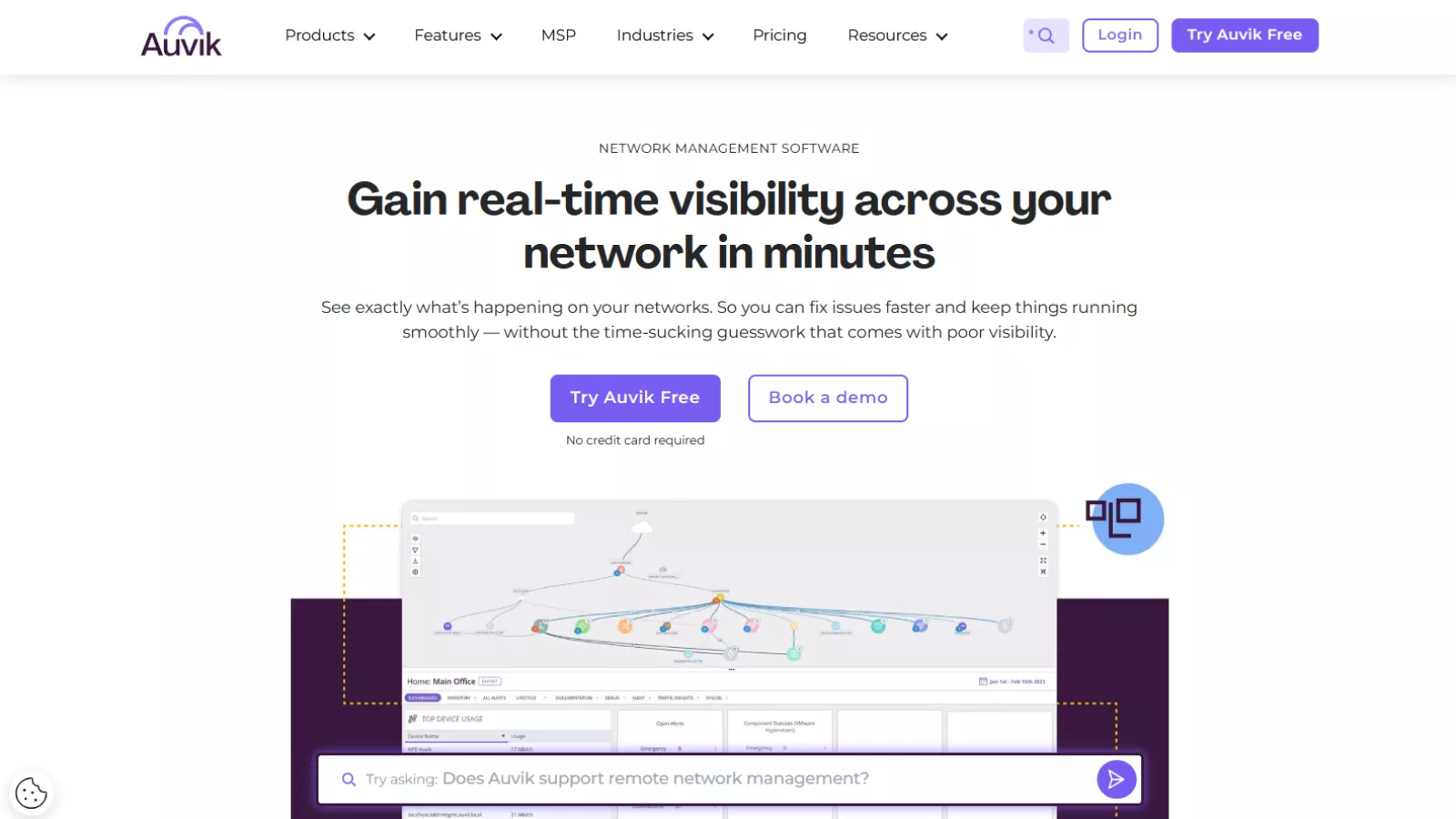
Auvik is a cloud‑based network monitoring and management platform built primarily for IT teams and managed service providers. Its core promise is straightforward: deploy quickly, discover everything automatically, and give teams a clear, real‑time view of what’s happening across the network.
Once deployed, Auvik scans the network, identifies connected infrastructure devices, and builds a live topology map that updates as the environment changes. From there, it layers in performance monitoring, traffic analysis, configuration backups, alerting, and remote management tools.
Unlike heavier platforms that require weeks of tuning before becoming useful, Auvik is designed to work almost immediately. That philosophy, automation first, configuration second, defines most of the product experience.
First Impressions and Deployment Experience
One of the most consistently praised aspects of Auvik is how fast it gets up and running. Deployment typically involves installing a lightweight collector on‑premises, configuring SNMP credentials, and letting the platform do the rest.
In many real‑world setups, full network visibility is achieved within the same day. Devices begin appearing automatically, topology maps start forming in real time, and dashboards populate without requiring extensive manual input. Watching the network map build itself feels less like setup and more like discovery.
This ease of deployment makes Auvik particularly attractive for teams managing multiple sites or onboarding new client environments. There’s very little friction between “installed” and “useful,” which isn’t something every network monitoring tool can claim.
Automated Network Discovery and Mapping
Automated discovery is where Auvik clearly stands out. The platform continuously scans the network and maintains an up‑to‑date inventory of infrastructure devices such as switches, routers, firewalls, and controllers.
What makes this feature especially useful is the live topology mapping. Rather than static diagrams, Auvik creates interactive visual maps that evolve as devices connect, disconnect, or change roles. Traffic flows between devices can be followed across VLANs and subnets, making it easier to understand how data moves through the environment.
For troubleshooting, this visual approach saves time. Instead of jumping between tools or documentation, teams can click directly on devices, inspect relationships, and drill down into performance data from the same interface.
That said, in very large or complex networks, maps can occasionally feel cluttered. Rare inaccuracies—such as links that don’t physically exist—can appear, though they’re usually easy to spot and correct. For most mid‑sized environments, the mapping remains clear and genuinely helpful.
Performance Monitoring and Alerts
Auvik provides real‑time performance monitoring across all discovered devices. Bandwidth usage, interface activity, uptime status, and alert history are displayed through clean, readable charts.
Out of the box, the platform includes more than 60 pre‑configured alerts. These cover common network issues such as high utilization, device downtime, and unusual traffic patterns. For teams that don’t want to spend weeks tuning thresholds, this is a major advantage.
Alerts are actionable rather than noisy in most cases. When something triggers, it’s easy to see what’s affected, when the issue started, and how it fits into the broader network context. For MSPs, this often means catching problems before end users even notice them.
Customization exists, but it’s not Auvik’s strongest area. Teams looking for highly granular or unconventional alert logic may find the platform somewhat restrictive compared to more enterprise‑focused tools.
Traffic Analysis and NetFlow Insights
Traffic analysis is another area where Auvik adds real operational value. Using NetFlow data, the platform shows which applications and devices are consuming bandwidth, where congestion occurs, and how usage trends evolve over time.
This level of insight is particularly useful for:
- Identifying bandwidth hogs
- Investigating performance complaints
- Planning capacity upgrades
- Justifying infrastructure investments
Rather than relying on assumptions, teams can point to real usage data. Over time, these insights become more accurate as Auvik continues learning traffic patterns within the environment.
Configuration Management and Backups
Configuration management is often overlooked until something breaks. Auvik handles this quietly but effectively by automatically backing up device configurations and tracking changes over time.
The configuration comparison feature is especially valuable. Teams can view side‑by‑side differences between versions to quickly identify what changed, when it changed, and whether it was authorized. This eliminates a lot of manual SSH sessions and guesswork during troubleshooting.
If needed, previous configurations can be restored, helping maintain business continuity and reducing recovery time after misconfigurations.
Remote Management Capabilities
Auvik includes several built‑in remote management tools that reduce the need for on‑site visits. These include:
- An in‑app terminal for SSH and Telnet
- Remote browser access to device web interfaces
- Secure remote tunneling for various protocols
For distributed teams and MSPs, these features streamline daily operations. Issues can be investigated and resolved directly from the Auvik interface, without switching between multiple tools.
Ease of Use and Interface Design
Ease of use is one of Auvik’s biggest strengths. The interface is clean, modern, and intuitive—even for users who aren’t deep networking specialists.
Interactive maps, hover‑over details, and logical navigation make it easy to find what you need quickly. Whether accessed from a desktop browser or a mobile device, the platform remains responsive and readable.
Most users can become productive with minimal training. However, advanced features still require solid networking knowledge to use effectively, which is reasonable given the nature of the tool.
Auvik Pricing: What to Expect From Its Personalized Model

Auvik doesn’t list flat pricing tiers directly on its website. Instead, it follows a custom, personalized pricing model that adjusts based on your organization’s size and network complexity.
To get a pricing estimate, teams are asked to fill out a short form with details like company size, role, and contact information. From there, Auvik provides a tailored quote rather than a one-size-fits-all number. This approach reflects how the platform is actually used, pricing scales with the number of billable network infrastructure devices, not users or locations.
In practice, this means switches, routers, firewalls, and controllers count toward billing, while endpoints like servers, workstations, printers, and access points are typically monitored at no additional cost. For IT teams managing lean infrastructure, this can feel reasonable and predictable. For larger or rapidly growing networks, costs can rise faster than expected.
The upside of personalized pricing is transparency at the device level. Teams know exactly what they’re paying for and aren’t restricted by user limits or site caps. Unlimited users and multiple locations are included, which is especially useful for MSPs and distributed IT environments.
The tradeoff is that pricing clarity comes later in the buying process. Without upfront numbers, it can be harder to compare Auvik against other network monitoring tools during early evaluation. Some users also report needing to closely monitor device classification to avoid unexpected billing as networks evolve.
Overall, Auvik’s pricing model aligns well with its target audience—small to mid-sized IT teams and MSPs that value flexibility and scalability. However, organizations with large, device-heavy environments or strict budget predictability may want to evaluate how quickly costs scale before committing.
Customer Support Experience
Auvik offers support via live chat, email, and a detailed knowledge base. Support hours cover most business needs, with faster response times for critical issues.
The support team demonstrates strong technical knowledge, which is important given the complexity of network environments. That said, some users report slower response times compared to earlier experiences, particularly as initial triage processes have expanded.
For organizations that require round‑the‑clock support, limited weekend coverage may be a consideration.
Integrations and Ecosystem
Auvik integrates with several popular IT management tools, including ticketing systems and collaboration platforms. Common integrations include Autotask for automated ticket creation and Microsoft Teams for real‑time alert notifications.
These integrations help Auvik fit naturally into existing workflows, reducing manual follow‑ups and keeping teams aligned when issues occur.
Alternatives To Auvik
LogicMonitor
A strong alternative to Auvik for enterprises that need AI-driven monitoring, predictive alerts, and deep analytics across large-scale environments.
SolarWinds Network Performance Monitor
Best suited for organizations that want extensive customization, detailed reporting, and full control over complex on-premise networks.
Paessler PRTG
A flexible network monitoring solution ideal for Windows-focused environments that prefer sensor-based monitoring and custom thresholds.
NinjaOne
A good fit for MSPs looking for an all-in-one IT operations platform that combines network monitoring with endpoint and patch management.
Datadog Network Monitoring
An excellent option for cloud-first and hybrid infrastructures that require unified visibility across networks, applications, and cloud services.
Auvik vs Other Network Monitoring Tools
In the broader network monitoring landscape, Auvik competes with tools like LogicMonitor, SolarWinds NPM, Paessler PRTG, and NinjaOne.
Where Auvik excels:
- Fast deployment
- Automated discovery and mapping
- Ease of use
- Strong visibility with minimal upkeep
Where competitors may lead:
- Advanced customization
- AI‑driven analytics
- Enterprise‑level reporting
Auvik tends to appeal most to teams that value simplicity and speed over deep customization.
Who Should Use Auvik?
Auvik is a strong fit for:
- Small to mid‑sized IT teams
- Managed service providers
- Organizations with distributed networks
- Teams that want fast setup and low maintenance
It may be less ideal for:
- Very large enterprises with complex custom requirements
- Teams needing extensive alert logic customization
- Organizations seeking flat‑rate pricing at scale
Final Verdict
Auvik delivers exactly what it promises: fast, automated network visibility with minimal friction. Its discovery and mapping capabilities save time, its monitoring tools provide meaningful insights, and its interface makes complex networks easier to understand.
While pricing and customization limitations may not suit every organization, Auvik remains a reliable and efficient network monitoring solution for teams that value clarity, speed, and ease of use.
For IT teams and MSPs looking for a modern approach to network management software, this Auvik review makes one thing clear: it’s a tool that works well out of the box—and keeps working with surprisingly little effort.
Additional FAQs About Auvik
Does Auvik require agents on every device?
No, Auvik does not require agents to be installed on every device. It uses an on-premises collector along with protocols like SNMP, NetFlow, and APIs to gather data from network infrastructure. This keeps deployment lightweight and reduces overhead on individual devices.
Can Auvik monitor cloud and hybrid environments?
Yes, Auvik works well in hybrid setups. While its strength lies in monitoring on-premises network infrastructure, it can also provide visibility into cloud-connected networks and distributed sites as long as the collector has access to the relevant network segments.
Is Auvik suitable for non-technical teams?
Auvik is designed primarily for IT professionals, but its visual maps and preconfigured alerts make it approachable even for less experienced staff. Non-technical teams may understand high-level issues, though advanced troubleshooting still requires networking knowledge.
How does Auvik handle network changes?
Auvik continuously scans the network and updates topology maps automatically. When devices are added, removed, or reconfigured, the platform reflects those changes in near real time, helping teams stay aligned with the current network state.
Can Auvik be used for compliance or audits?
Yes, Auvik’s configuration backup and change tracking features are useful for audits and compliance checks. Teams can review historical configuration changes, verify standards, and restore approved versions when needed.
Does Auvik slow down the network?
Auvik is designed to be low impact. The collector uses standard monitoring protocols and does not introduce noticeable latency or performance degradation when configured correctly.
What happens if the internet connection goes down?
If connectivity to the cloud platform is interrupted, the local collector continues collecting data. Once the connection is restored, data syncs back to Auvik, minimizing visibility gaps.
Is Auvik a good long-term solution?
For small to mid-sized IT teams and MSPs, Auvik scales well over time as networks grow. However, organizations expecting rapid expansion should regularly review device counts and pricing to ensure long-term cost alignment.