
Where Smarter Businesses Discover the Right Software.

Lucen Timeline Review: A Quick look At This simple PowerPoint Timeline Maker.

lucen-timeline-review-a-quick-look-at-this-simple-powerpoint-timeline-maker

Most timeline tools either overwhelm you with complexity or limit you with rigid templates. Lucen Timeline (formerly Office Timeline) sits right in the middle as a PowerPoint-friendly timeline and Gantt chart solution designed for professionals who need polished visuals without hours of manual formatting. A PowerPoint-friendly timeline and Gantt chart generator designed for professionals who need polished visuals without hours of manual formatting.

In this Lucen Timeline Review, I’ll break down how the platform works, who it’s best for, where it falls short, and whether the pricing justifies the value. This isn’t a promotional walkthrough; it’s the kind of practical evaluation SaasTrac readers expect: clean, honest, and based on real usability.

What Exactly Is Lucen Timeline?

Lucen Timeline is a Gantt chart solution from Software that integrates directly with Microsoft PowerPoint. It enables teams to create professional timelines, roadmaps, and Gantt charts without building them manually.

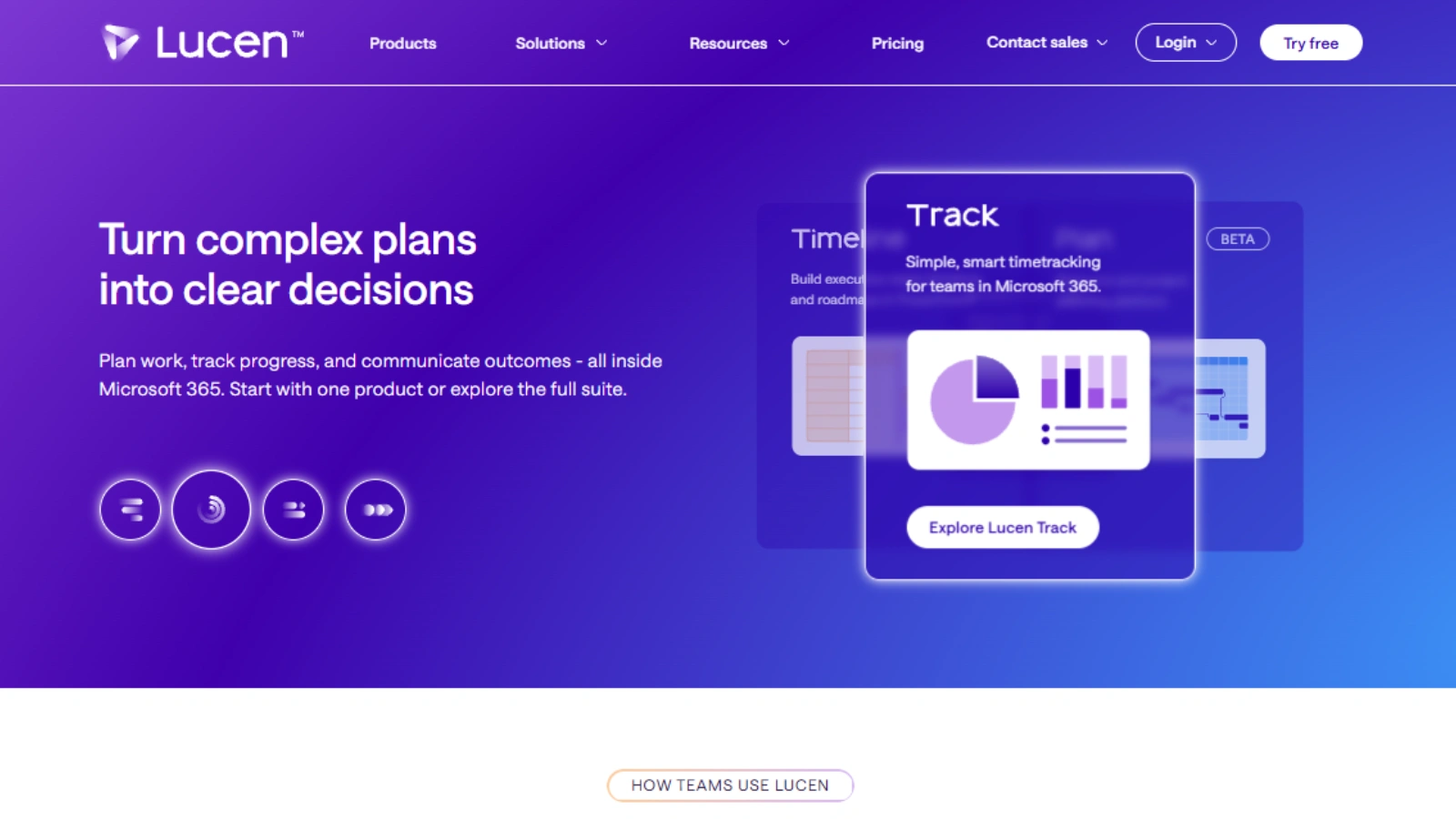
Alongside the PowerPoint add-in, Lucen also offers a browser-based version for creating and sharing timelines online. As part of the broader Lucen platform, it now sits alongside other products like Lucen Track, Lucen Plan (Beta), and Lucen Flowchart (Beta), giving teams additional tools for time tracking, planning, and process mapping.

Who Lucen Timeline Is Built For

After reviewing the platform, these users will benefit the most:

Project Managers & PMOs

Create professional timelines, Gantt charts, and project updates that are easy for stakeholders to understand. Features like Swimlanes, Dependencies, and Planned vs. Actual tracking make managing complex projects much simpler.

Consultants & Business Professionals

Ideal for anyone who regularly builds presentations, proposals, or executive reports in PowerPoint and needs polished visuals without spending hours on formatting.

Teams Using Microsoft 365

Organizations already working in Microsoft 365 can benefit from Lucen’s ecosystem, which combines Timeline, Track, Plan (Beta), and Flowchart (Beta) to support planning, reporting, and work tracking.

Operations, Product & Cross-Functional Teams

Teams managing multiple initiatives can use Lucen to organize project data, import schedules from Excel, visualize dependencies, and communicate progress more effectively.

If your organization relies on Microsoft 365 for planning and reporting, Lucen provides a streamlined way to turn complex work into clear, presentation-ready insights.

How Lucen Timeline Works 

Lucen Timeline is a Microsoft PowerPoint add-in that helps you create professional timelines and Gantt charts without leaving PowerPoint. Instead of manually drawing shapes and adjusting layouts, you can build polished project visuals in just a few clicks.

1. Timeline for PowerPoint

Once installed, Lucen Timeline appears as a dedicated tab inside Microsoft PowerPoint.

From there, you can:

  • Create professional timelines and Gantt charts
  • Choose from built-in timeline layouts and templates
  • Import project data directly from Excel
  • Add milestones, tasks, and dependencies
  • Organize work using swimlanes
  • Customize colors, fonts, and branding
  • Track planned vs. actual progress (Expert plan)
  • Export presentation-ready visuals without additional formatting

Because it works directly within PowerPoint, the learning curve is minimal for users already familiar with Microsoft Office.

2. Part of the Lucen Platform

Lucen is now more than a timeline tool. It includes a suite of Microsoft 365-native applications designed to help teams plan, track, and communicate work.

The platform includes:

  • Lucen Timeline – Create timelines and Gantt charts in PowerPoint.
  • Lucen Track – Track time, workloads, and project effort inside Microsoft 365.
  • Lucen Plan (Beta) – Build and manage project schedules with Gantt timelines in Excel, including task dependencies and planning templates.
  • Lucen Flowchart (Beta) – Create flowcharts, process diagrams, and swimlane diagrams directly in PowerPoint.

This ecosystem allows teams to move from planning and tracking to reporting without leaving the Microsoft 365 environment, making Lucen a more comprehensive solution than the former Office Timeline product.

Key Features Worth Noting

key-features-worth-noting

Here are the features that stand out in the latest version of Lucen Timeline.

1. Professional Timeline & Gantt Chart Creation

Lucen Timeline helps you build presentation-ready visuals directly inside PowerPoint.

You can create:

  • Project timelines
  • Gantt charts
  • Roadmaps
  • Program timelines

The visuals are fully customizable with your own branding and formatting.

2. Excel Import & Automated Timeline Creation

Instead of building timelines manually, you can import project data from Excel and let Lucen generate a polished timeline automatically.

It handles:

  • Dates
  • Milestones
  • Task alignment
  • Formatting

This significantly reduces the time spent creating executive-ready presentations.

3. Swimlanes & Dependencies

One of Lucen Timeline’s strongest features is its ability to visualize complex projects.

You can organize work by:

  • Teams
  • Workstreams
  • Departments
  • Project phases

Dependencies make it easier to communicate how tasks relate to one another.

4. Planned vs. Actual Tracking

Higher-tier plans include Planned vs. Actual tracking, allowing you to compare project schedules against real progress.

This makes status reporting much clearer for stakeholders and leadership teams.

5. Custom Styling & Branding

Timelines can be customized to match your organization’s presentation standards.

You can modify:

  • Colors
  • Fonts
  • Layouts
  • Branding elements

This helps create consistent, client-ready reports without extensive manual editing.

6. Microsoft 365 Integration

Lucen is designed to work within the Microsoft ecosystem.

Alongside the PowerPoint Timeline add-in, the platform also offers:

  • Excel-based project planning (Plan)
  • Microsoft 365 time tracking (Track)
  • Flowchart creation in PowerPoint (Flowchart)

This makes Lucen more than just a timeline tool—it’s a growing suite for planning, tracking, and communicating project work within Microsoft 365.

Lucen Timeline Pro, Pro+, Expert: What’s the Real Difference?
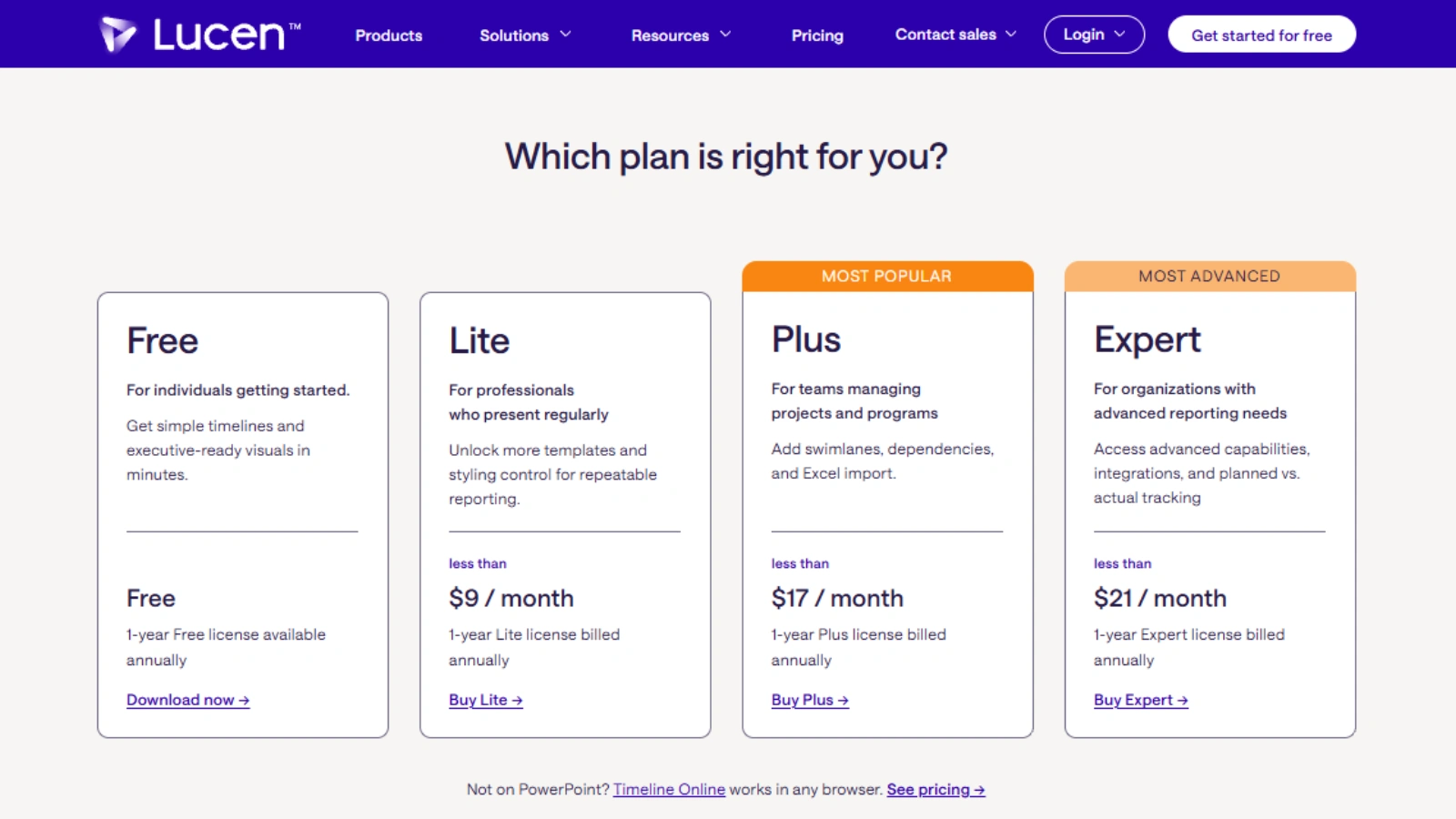
Free

Best for individuals getting started with timeline creation.

  • Basic timeline and Gantt chart creation
  • Executive-ready visuals
  • Essential templates

Lite

Ideal for professionals who regularly present project updates.

  • More templates
  • Additional styling controls
  • Better customization for repeatable reporting

Plus

The most popular plan for teams managing projects and programs.

Adds:

  • Swimlanes
  • Dependencies
  • Excel Import

This is the edition most project managers will get the most value from.

Expert

Built for organizations with advanced reporting needs.

Includes everything in Plus, plus:

  • Advanced reporting capabilities
  • Integrations
  • Planned vs. Actual tracking

If you are managing complex projects across multiple teams, Expert is the better choice.

Lucen Timeline Pricing Review

Office Timeline offers four PowerPoint Add-in plans: Free, Lite, Plus, and Expert. Lite starts at less than $9/month, Plus at less than $17/month, and Expert at less than $21/month when billed annually.

For most professionals, Plus delivers the best value by adding Excel Import, Dependencies, and Swimlanes for more detailed project planning. Organizations that need integrations, advanced reporting, and planned vs. actual tracking will benefit most from Expert, while Lite is a cost-effective option for users who mainly need additional templates and customization.

Strengths & Weaknesses

Where Lucen Shines

  • Native integration with Microsoft PowerPoint and Microsoft 365
  • Creates professional timelines and Gantt charts with minimal effort
  • Excel Import makes it easy to build timelines from existing project data
  • Swimlanes, Dependencies, and Planned vs. Actual tracking improve project reporting
  • Extensive customization options for branding, layouts, and formatting
  • Expanding platform with Timeline, Track, Plan (Beta), and Flowchart (Beta) for broader planning and reporting needs

Where It Falls Short

  • Timeline add-in is available only for Microsoft PowerPoint on Windows
  • Advanced features are limited to the Plus and Expert plans
  • Plan and Flowchart are still in Beta and continue to evolve
  • Primarily designed for Microsoft 365 users, making it less appealing for teams using Google Workspace or other ecosystems
  • Focuses on project visualization and reporting rather than replacing full-featured project management platforms like Microsoft Project or Asana

Lucen Timeline Alternatives (Relevant & Accurate)

If you want something similar, here are the closest replacements:

⭐ Lucidchart

Lucidchart is best for teams that want collaborative, cloud-based timeline and diagram creation.

⭐ Visme

Offers more design freedom — timelines, infographics, reports, and presentations.

⭐ Preceden

Simple, professional timelines for consultants, teachers, and planners.

⭐ Timeline Maker Pro

Desktop software for users who prefer offline, data-driven visuals.

⭐ GanttPRO

Not a direct visual competitor, but excellent for teams needing full project management plus presentable timelines.

These match Lucen Timeline’s purpose—timeline and project visualization, not video or content creation.

Also Read

Lucidchart Review 2025: Pricing, Features, And Much More

Final Verdict: Is Lucen Timeline Worth It?

Lucen is no longer just a timeline creator. It has evolved into a Microsoft 365-native platform that combines timeline creation, time tracking, project planning, and process visualization in one ecosystem.

If your primary need is creating professional timelines and Gantt charts in PowerPoint, Lucen Timeline remains an excellent choice. And if your team also needs time tracking, Excel-based planning, or flowchart creation, the broader Lucen suite offers room to grow without leaving the Microsoft environment.

For project managers, consultants, PMOs, team leads, and business professionals who rely on PowerPoint for stakeholder communication, Lucen helps turn complex project data into clear, presentation-ready visuals while reducing the time spent on manual formatting and reporting.

FAQs 

Q. Can I use Lucen on Mac?
Yes. Lucen’s cloud-based products are accessible through a web browser, while the Timeline PowerPoint add-in is designed for Microsoft PowerPoint on Windows.

Q. Does Lucen Timeline support Excel import?
Yes. The Plus and Expert plans include Excel Import, making it easy to turn spreadsheet data into professional timelines.

Q. Is there a free version?
Yes. Lucen offers a Free plan that lets you create basic timelines and Gantt charts, making it a good way to explore the platform before upgrading.

Q. What products are included in the Lucen platform?
Lucen includes Timeline for PowerPoint, Track for time tracking in Microsoft 365, Plan for Excel-based project planning (Beta), and Flowchart for creating diagrams in PowerPoint (Beta).

Q. Which Lucen plan is best for most users?
For most professionals, Plus offers the best value. It adds key features like Swimlanes, Dependencies, and Excel Import, making it ideal for managing projects and creating presentation-ready timelines.