

Work management tools are no longer just about tracking tasks. Teams now expect flexibility, automation, documentation, reporting, and collaboration—all without juggling five different apps. That’s where SmartSuite positions itself: as a unified platform that adapts to how teams actually work.
It is often described as an all-in-one alternative to traditional project management and no-code tools. But how well does it deliver in real-world use? And who is it actually built for?
In this detailed SmartSuite review, we’ll break down what the platform does well, where it struggles, and whether it suited well to makes sense for your team.
What Is SmartSuite?
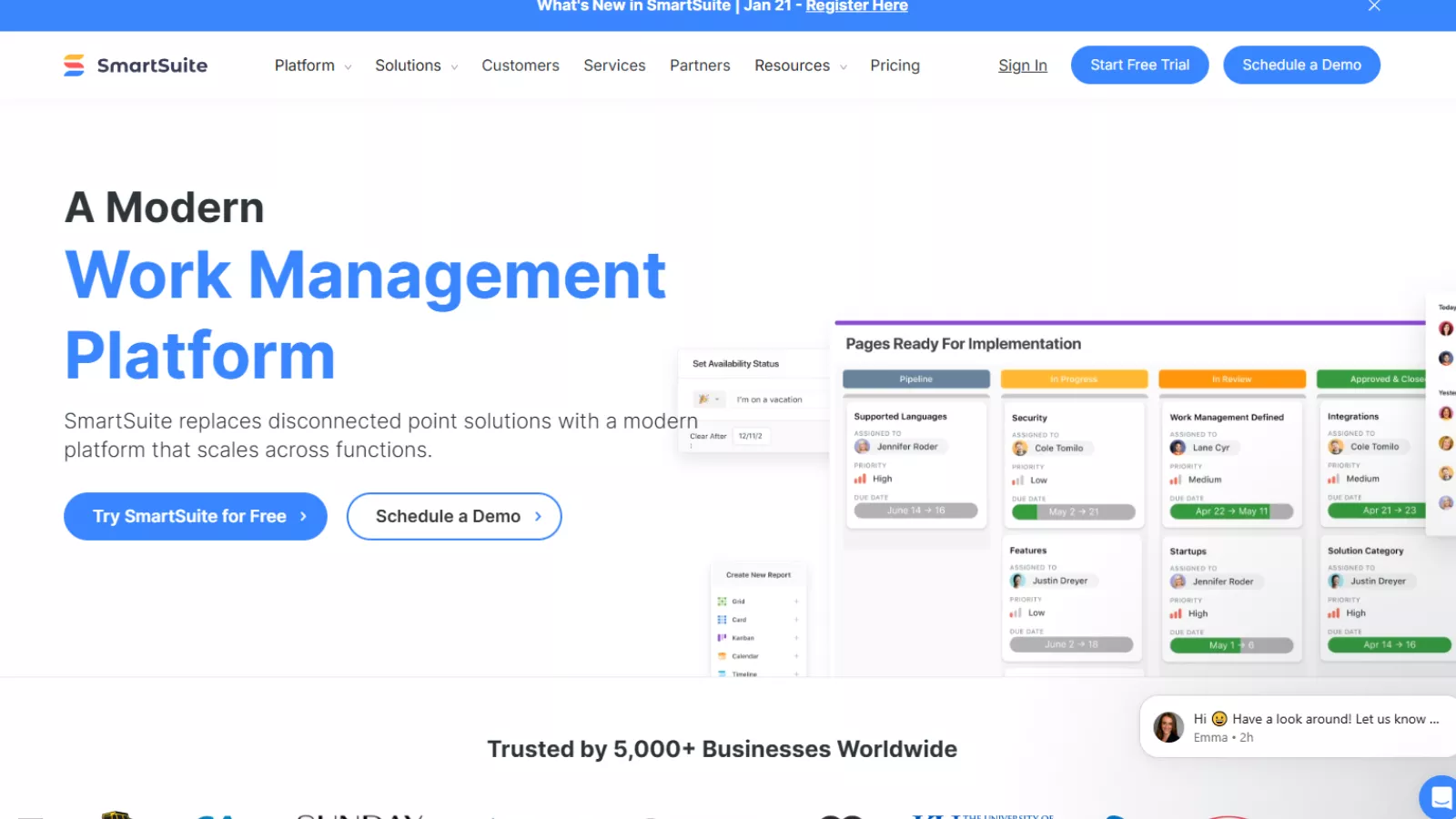
SmartSuite is a cloud-based work management platform designed to handle projects, processes, databases, documentation, and automation in one place. Unlike rigid task managers, it allows teams to design workflows around their own operations rather than forcing predefined structures.
At its core, SmartSuite combines elements of:
- Project management software
- No-code database tools
- Workflow automation platforms
- Team collaboration systems
This flexibility makes this software appealing to businesses that have outgrown basic task tools but don’t want the complexity of enterprise systems.
SmartSuite Online Experience and Platform Availability
It is fully web-based, meaning there’s no desktop software required. Teams can access SmartSuite online from any modern browser, making it easy to collaborate across locations.
In addition to the web version, the SmartSuite app is available for mobile users. The mobile experience has improved significantly, especially for managers who need quick visibility into dashboards, reports, and KPIs on the go.
Mobile users can:
- View dashboards and charts
- Update records
- Approve workflows
- Track progress without switching to desktop
This makes this software more practical for teams that operate remotely or across multiple job sites.
Interface and First-Time Usability
One of SmartSuite’s strongest advantages is its interface. Despite offering advanced functionality, the platform feels clean and approachable.
The layout avoids clutter and gives users:
- Customizable views (grid, kanban, calendar, timeline)
- Drag-and-drop interactions
- Clear navigation between workspaces
Even users new to management task platforms can get started quickly. Unlike tools that overwhelm users with settings upfront, it introduces complexity gradually as teams build out their workflows.
Customization That Actually Feels Useful
Customization is where SmartSuite truly stands out.
Instead of locking users into rigid task structures, it allows teams to design:
- Custom fields
- Relationships between records
- Tailored dashboards
- Role-based permissions
You can use this tool for:
- Project tracking
- Client onboarding
- Content planning
- Sales pipelines
- HR operations
- Asset management
Because of its flexibility, this tool is especially valuable for teams that don’t fit neatly into standard project templates.
Document Management Inside SmartSuite
Another most impactful update to this tool is its built-in document view.
Rather than storing notes inside small text fields, teams now get a full writing environment directly within SmartSuite. Documents support:
- Headings and formatting
- Tables and images
- Callouts and highlights
- Inline comments
- Version history
- Automatic table of contents
This allows teams to manage documentation, SOPs, briefs, and internal knowledge without relying on external tools like Google Docs or Notion.
Record Pages and Field-Level Collaboration
This software has significantly improved how teams interact with records.
Record pages now support tabs, allowing users to break large datasets into clean, organized sections. This reduces scrolling and makes complex records easier to manage.
Another notable addition is field-level comments. Instead of cluttered comment threads, discussions can now happen directly on specific fields. This is especially helpful when reviewing data, approvals, or sensitive updates.
Automation Capabilities in SmartSuite
Automation is one of the biggest reasons teams move to SmartSuite.
The platform supports:
- Trigger-based automations
- Manual button-trigger workflows
- Webhook triggers from external tools
- Conditional logic
- Automation loops
- AI-powered automation actions
Users can automate everything from task assignments to document generation and notifications.
One standout feature of this software is its customizable AI prompt action. Teams can design prompts that:
- Summarize records
- Validate data
- Translate content
- Generate structured outputs
Reporting and Dashboards
SmartSuite offers advanced reporting tools that help teams make data-driven decisions.
Dashboards are fully customizable and support:
- Charts
- Metrics
- Filters
- Real-time updates
Dashboards also work well on mobile devices, making it easier for leadership teams to stay informed without logging into desktop systems.
For teams managing complex operations, this reporting depth is a major advantage over simpler tools.
Integrations and Ecosystem
This software integrates with over 100 tools, including:
- Google Drive
- Slack
- QuickBooks
- Zapier-supported apps
These integrations allow teams to keep existing workflows intact while centralizing operations inside SmartSuite.
While it may not have as many native integrations as some competitors, its webhook and automation support make up for it.
Also Read
Notion Review: Excellent Project Management Software
SmartSuite Pricing: What to Expect
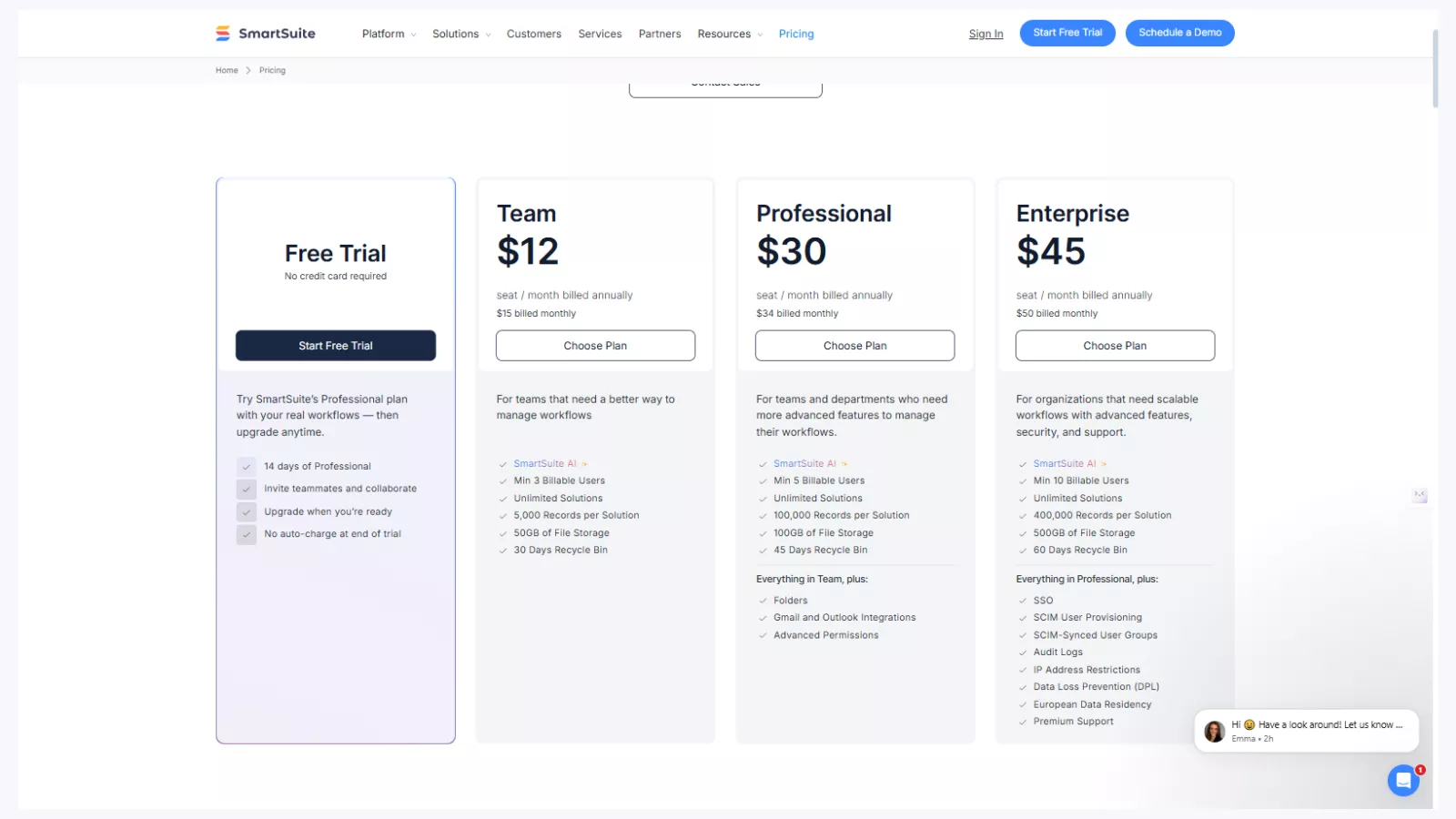
It offers four pricing options designed for different team sizes and operational needs. Each plan focuses on how much control, collaboration, and scalability you require.
Free Trial (14 Days)
The free trial gives full access to the Professional plan.
No credit card is required to start.
All core features are available during the trial period.
It’s meant for testing real workflows before upgrading.
Team Plan – $12 per user/month (billed annually)
This plan is built for small teams.
It supports basic task management and collaboration.
Users can create unlimited workflows and projects.
AI features are included at a basic level.
Advanced permissions and email integrations are not included.
Professional Plan – $30 per user/month (billed annually)
This is SmartSuite’s most popular plan.
It adds advanced access controls and permissions.
Email integrations with Gmail and Outlook are included.
Folder-level organization is available.
It is designed for teams managing complex workflows.
Enterprise Plan – $45 per user/month (billed annually)
This plan focuses on security and compliance.
Single Sign-On (SSO) is supported.
Audit logs and centralized user management are included.
Data protection and regional storage options are available.
It is built for large organizations and regulated industries.
Strengths And Limitations
Every platform has areas where it shines and areas where it may not be the best fit. And this tool is no different. Understanding both sides helps set the right expectations before adopting it as a core management task platform.
Where SmartSuite Performs Well
High customization flexibility
It allows teams to build their own systems instead of adapting to fixed structures. From custom fields and layouts to workflows and dashboards, everything can be shaped around how your business actually operates. This makes SmartSuite online especially useful for teams that manage unique or evolving processes.
Strong automation capabilities
Automation in this software goes beyond basic triggers. Teams can automate task assignments, status updates, notifications, approvals, and data movement between records. These automations reduce manual effort and help maintain consistency across complex workflows without constant oversight.
Built-in documentation tools
Unlike many management tools that rely on external apps for documentation, it includes native documentation features. Teams can create guides, SOPs, notes, and references directly within the platform. This keeps knowledge tied to workflows instead of scattered across different tools.
Clean and intuitive UI
The smart suite app is designed with clarity in mind. Navigation feels logical, views are easy to switch, and layouts can be adjusted without overwhelming users. Even teams transitioning from simpler tools can get comfortable with the interface relatively quickly.
Scales well with growing teams
SmartSuite is built to handle increasing complexity. As teams grow, they can add more automations, permissions, and data layers without needing to migrate to another tool. This makes it a long-term solution rather than a temporary setup.
Where SmartSuite May Fall Short
Learning curve for advanced setups
While basic usage is straightforward, advanced configurations require time and planning. Setting up complex automations, permission structures, and relational databases can feel overwhelming for users without prior experience in flexible platforms.
Not ideal for teams wanting rigid templates
It prioritizes flexibility over fixed workflows. Teams looking for strict, pre-defined templates may find the open-ended structure challenging. It assumes users want to design their own systems rather than follow a locked format.
Pricing may be high for very small teams
For solo users or very small teams with simple needs, its pricing may feel expensive compared to basic task management tools. The value becomes clearer as workflows and team size increase.
Who Should Use SmartSuite?
This software is well-suited for teams that require control, adaptability, and structure. Operations teams benefit from its automation and reporting features. Product teams can manage roadmaps, feedback, and development cycles in one place. Agencies can track clients, projects, and internal processes without switching tools.
Remote-first businesses find SmartSuite online effective for centralized collaboration. Teams managing complex workflows appreciate the ability to connect tasks, data, and documentation seamlessly. It works best for organizations that want their systems to match their processes, not the other way around.
Who Might Need an Alternative?
This software may not be the right choice for teams that only need basic task tracking with minimal customization. Users who prefer ready-made workflows with little setup may feel that it requires unnecessary effort. It may also not suit those whose primary goal is finding the cheapest tool available rather than a scalable system.
Also Read
ClickUp Review | All-in-One Project Management and Productivity Platform
Asana Review | Solid Task Management And Collaboration Software
SmartSuite Alternatives (One-Line Overview)
- ClickUp – Feature-rich task management with a focus on productivity tracking
- monday.com – Structured project management with visual workflows
- Airtable – Database-first platform with strong customization
- Asana – Simple task and project coordination for smaller teams
- Notion – Flexible workspace for documentation and lightweight project tracking
FAQs
Can SmartSuite be used without automation?
Yes, the platform functions effectively even when automation is not in use. Teams can manage tasks, track projects, organize records, collaborate through comments, and maintain documentation without relying on automated workflows. Many teams start by using it as a structured work and data management system before gradually introducing automation later. While automation adds efficiency and reduces repetitive work, it is not required for day-to-day operations, making the system flexible for teams at different maturity levels.
Does SmartSuite support role-based access control?
Yes, access control is handled through a detailed permission structure that allows teams to manage visibility and editing rights at multiple levels. Permissions can be applied to entire workspaces, individual records, and even specific fields. This ensures that sensitive data remains protected while still enabling collaboration across departments. Such granular control is particularly useful for organizations handling confidential information or operating in regulated environments.
Is SmartSuite suitable for non-technical teams?
Yes, the platform is designed to be approachable for users without technical backgrounds. Core features like task tracking, record updates, dashboards, and collaboration tools are intuitive and easy to learn. Most users can begin working productively with minimal guidance. While more advanced features, such as complex automations or relational database structures, may require some onboarding or training, everyday usage does not demand technical expertise.
Can SmartSuite replace multiple tools?
For many organizations, it can significantly reduce the need for separate tools. Task management, documentation, workflow tracking, reporting, and internal collaboration can all be handled within a single environment. By centralizing these functions, teams spend less time switching between apps and more time focusing on execution. This consolidation also improves data consistency and visibility across projects and departments.
Does SmartSuite offer onboarding support?
Yes, users have access to a range of onboarding resources designed to ease adoption. These include help documentation, tutorials, and best-practice guides. In addition, customer support is responsive and available to assist with setup questions, workflow design, and feature usage. This support structure helps teams transition smoothly, whether they are migrating from simpler tools or replacing a more complex system.
Final Verdict: Is SmartSuite Worth It?
SmartSuite is not a lightweight task tracker—and that’s intentional.
It’s a flexible, powerful platform designed for teams that need control, visibility, and automation across their operations. Its online version delivers a strong balance between customization and usability, while its app ensures teams stay connected on the move.
If your team has outgrown basic management task tools and wants a system that adapts to your workflows, this tool is really worth serious consideration.